Blog Biz Tools I Use to Keep Operations Smooth and Fun

Let’s be honest: the business side of blogging isn’t always glamorous. For creatives, it can feel like a chore to put aside the fun, creative work and focus on the administrative tasks of running a business. Yet those behind-the-scenes tasks are essential if you want to treat your blog like a real business.
Fortunately, there are tools and workflows that make managing the business side of blogging far easier — and sometimes even enjoyable. Below I’ve shared the practical systems I use daily to keep my workflow organized and efficient. I use Adobe Document Cloud products across many of these steps, and everything here reflects my actual process.

Edit PDFs Instead of Recreating Them: I hate recreating media kits or client decks every time a small detail changes. I use Adobe Acrobat’s Edit PDF tool to update text and swap images directly inside the original file. It’s fast, preserves fonts and layout, and means I don’t have to rebuild documents from scratch. I also store and share files in the cloud so my team can access the latest versions whenever needed.
Send and Sign Contracts Quickly: For contracts and releases, I use Adobe Sign’s Send for Signature feature. It’s especially handy for photo releases with models or agreements with vendors who rent our studio. The recipient receives an email and can sign without needing any special software. Adobe Sign also creates an audit trail that records when the document was opened and signed, giving you a legally useful record if questions arise later.
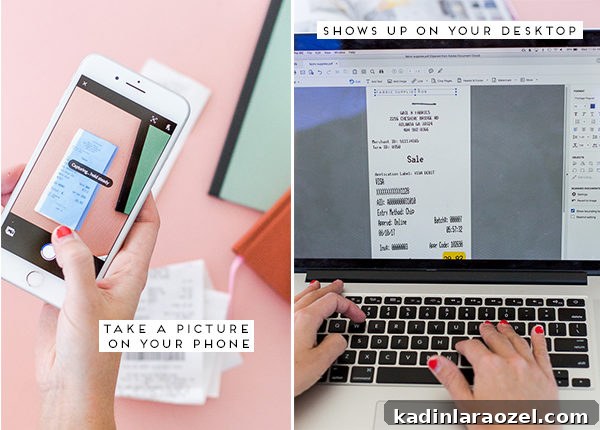
Digitally Track and Organize Receipts on Your Phone: I buy a lot of props and supplies every month, so I started scanning receipts monthly with the free Adobe Scan app. I collect paper receipts in a bag, scan them at month’s end, then store the paper copies away. Scanning creates searchable PDFs and backs up each receipt in the cloud and on my desktop, which made tax time far less stressful—especially while I was traveling.
The scanned images also appear automatically in Adobe Acrobat, so everything is centralized. Being able to search receipts by keyword saved me time with my accountant and kept my expense records tidy and accessible.

Once these Document Cloud tools are part of your routine, you can use them for creative tasks too — the stuff that originally drew you to blogging.
Create and Share Style Guides and Inspiration Boards from Your Phone: Adobe Scan isn’t only for receipts. I use it to assemble style guides and mood boards by scanning swatches, notes, or sketches and combining them into a single PDF to share with collaborators or clients. It’s quick to email a finished PDF for remote review and edits.
Make Downloadables and Printables Straight from Your Phone: Adobe Scan can also be used to create downloadable printables. I’ve made simple printables entirely from phone-captured content, processed and exported as a PDF. If you want step-by-step instructions, search for tutorials on turning phone photos into print-ready PDFs — it’s easier than you think.


Have you tried any of these methods? I’d love to hear what apps and digital tools have helped your business. Share your favorites or tips—always learning from other creators’ workflows!
P.S. Want more business tips for blogging? I recorded a short interview about staying productive on the road, beating creative ruts, and keeping a blog running smoothly while traveling. It’s a quick watch if you want more behind-the-scenes insight.
—
This post was created in partnership with Adobe Document Cloud. All opinions are my own. Thanks for supporting the brands that help keep Paper & Stitch running.